Operations platform for service businesses
One agent that runs the busywork of your business.
One agent that watches your whole business — QuickBooks, calendar, reviews, email, and texts — books the work to your calendar, and acts on it from a text message.
No credit card charged during the trial · Connect or disconnect your tools anytime

SagiFlo plugs into the tools you already run — and the agent reads all of them at once.
- TelegramText your agent; it answers with live business data and proposes actions.
- Google CalendarTwo-way sync: reads your schedule for conflicts, and books, moves, and cancels the jobs SagiFlo creates.
- Google Business ProfileWatches for new reviews and rating changes and flags them, so you can respond while they’re still fresh.
- Email & SMSSends the review requests, follow-ups, and appointment reminders you approve — by email and text (via Twilio).
- QuickBooksLive finances — invoices, payments, and cash flow the agent can read. Included on every plan.
How it connects
Everything you run, in one place — with one tap to act.
SagiFlo reads your tools, watches for what matters, and proposes the next step. You approve from a Telegram chat — nothing happens without you.
What SagiFlo does for you
Everything SagiFlo will do for your company — step by step.
Follow the flow below the way your work actually moves: a lead comes in, gets booked, gets done, earns a review, and shows up in your numbers. Every screen you see is a live capture from the current product — not a mockup.
Every morning
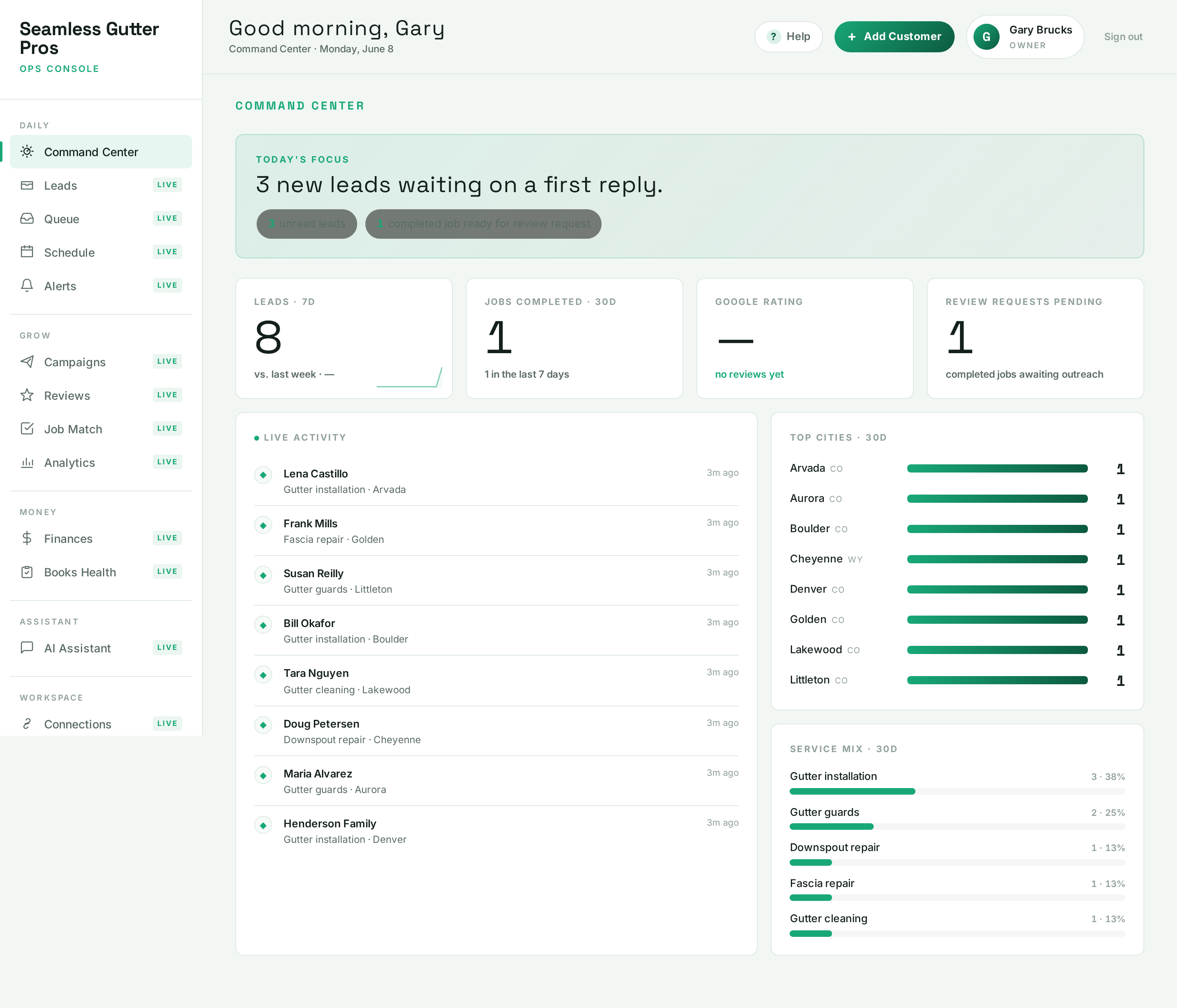
AutomaticYour day starts already sorted
Before you open a single tool, SagiFlo has read your books, pipeline, and reviews and built the morning cockpit: live revenue, profit, and cash straight from QuickBooks, your quote win rate and pipeline in flight — and a short “Needs you now” list of the things that actually need a decision from you.
- Live revenue, profit, and cash — read straight from QuickBooks
- “Needs you now”: overdue invoices, waiting leads, reviews to ask for
- Quote win rate, pipeline value, and lead trends beside it
Live screen 1 of 11 — captured from the current product. A lead comes in
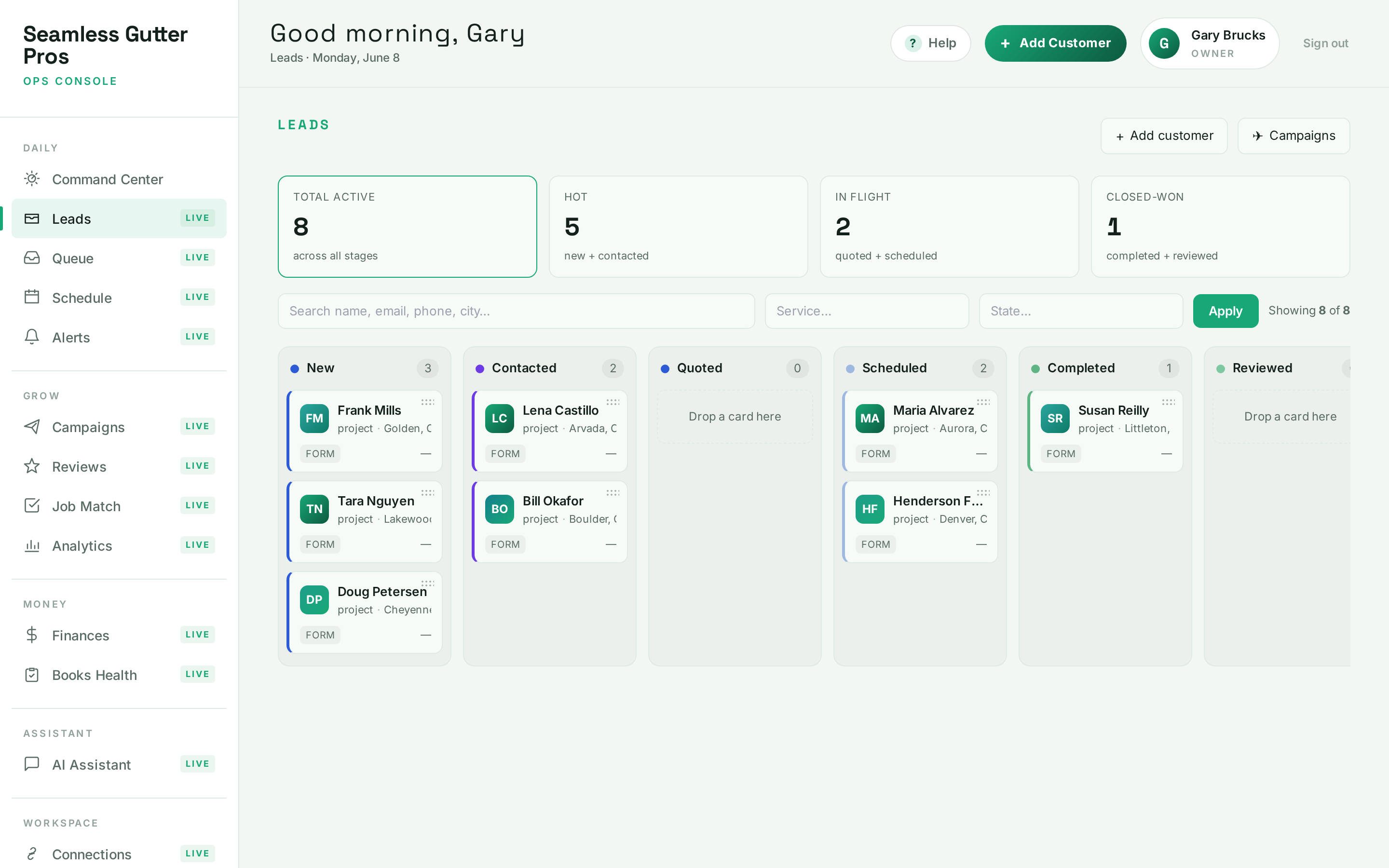
AutomaticNo lead ever goes cold
Every enquiry lands on one Pipeline board and moves from New through Quoted, Scheduled, Billed, and Reviewed. Cards age visibly when they sit too long, job values ride on every card, and teammates get assigned right on the board. Drag a card to move a deal forward; the whole team sees it live.
- One board for every lead, from first contact to review
- Cards change color as they age — nothing sits quietly
- Job values and owners on every card; live for the whole team
Live screen 2 of 11 — captured from the current product. Ready to book
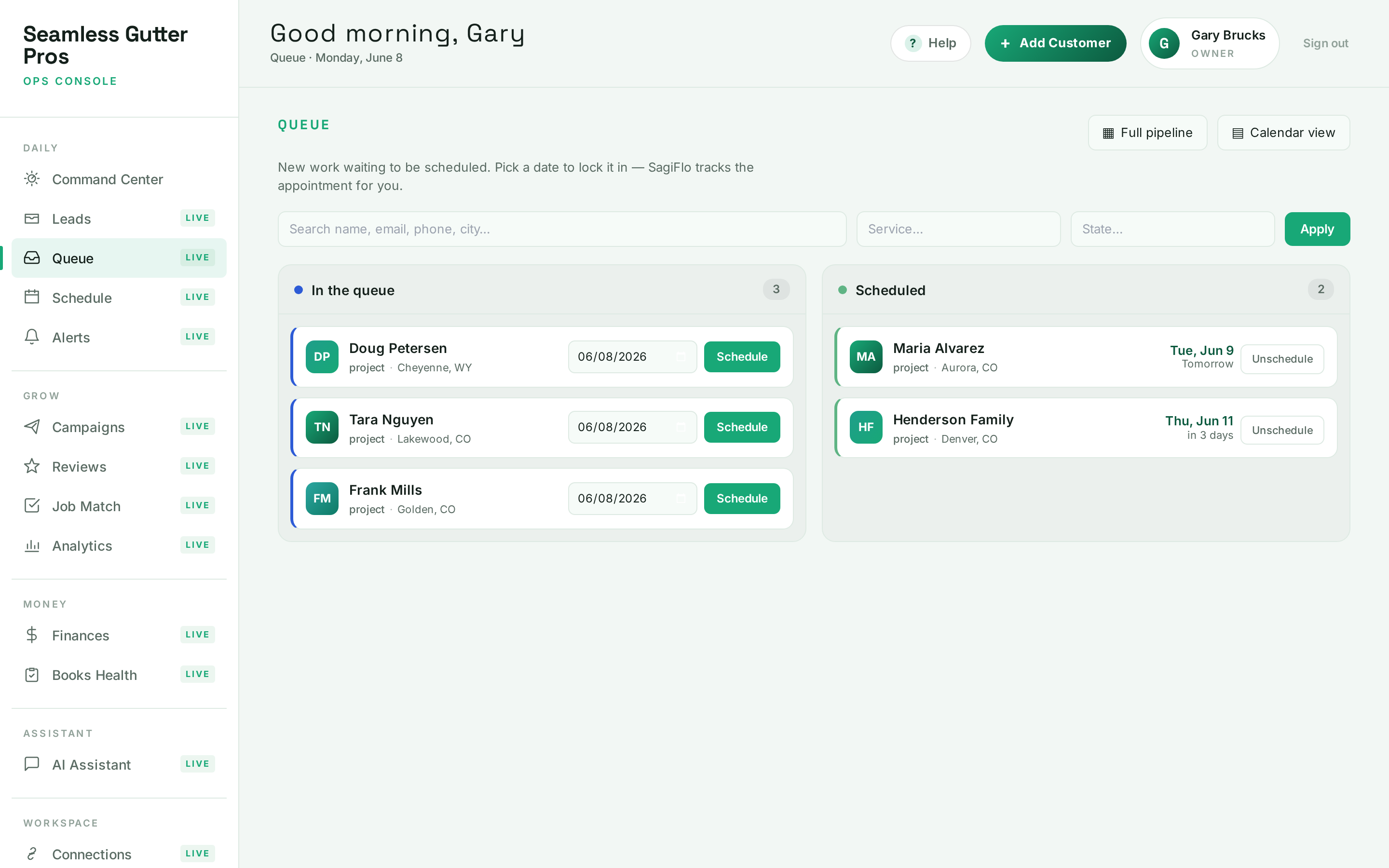
One clickPick a date — SagiFlo books the job
New work waits in the queue until you give it a date. Pick one and SagiFlo writes the appointment to your Google Calendar, arms the customer’s appointment reminders, and tracks it from there. Reschedule or pull a job back to the queue in one click.
- One click writes the job to your Google Calendar
- Appointment reminders armed automatically (email or text)
- Reschedule or unschedule without re-typing anything
Live screen 3 of 11 — captured from the current product. On the calendar
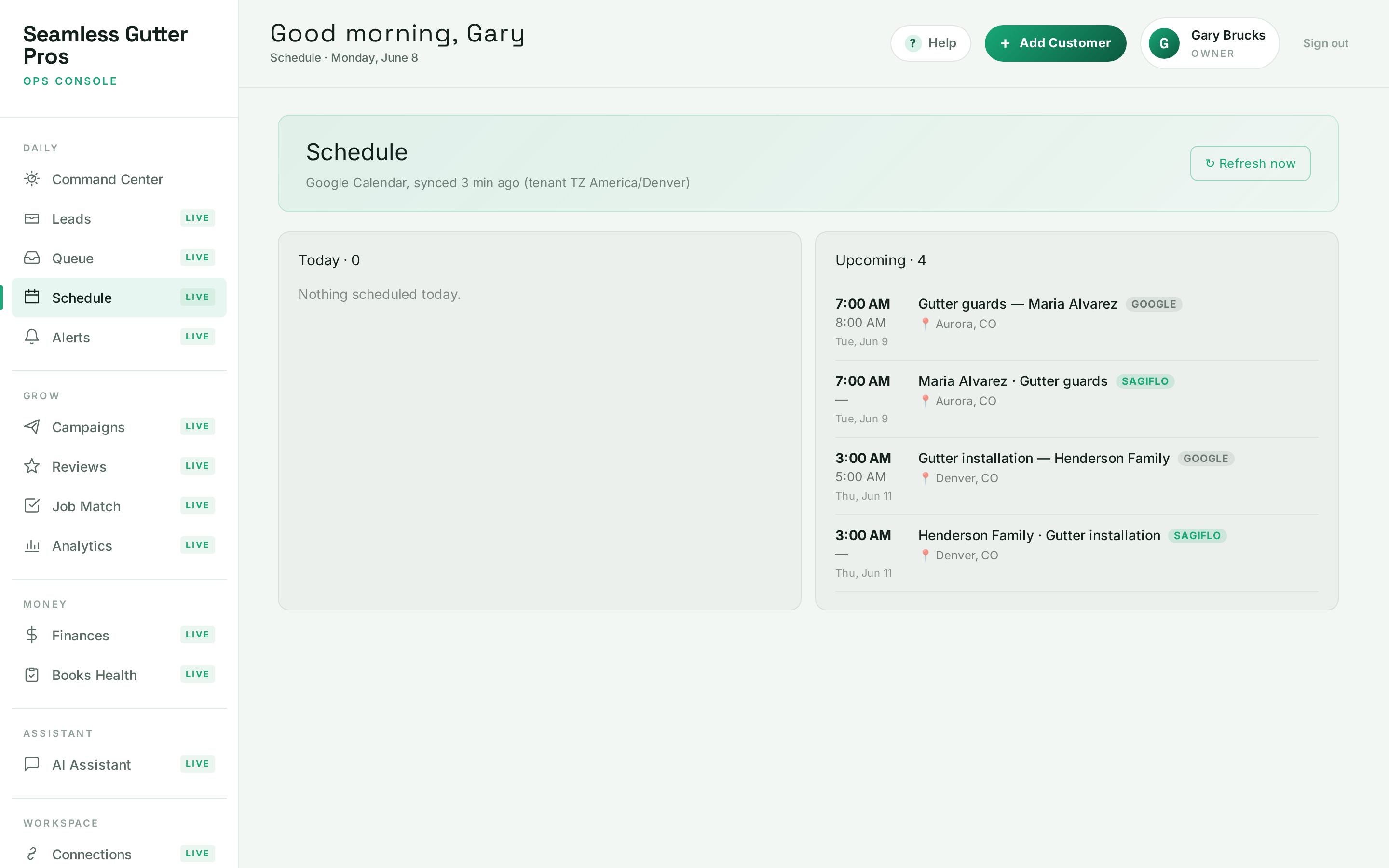
One clickYour schedule, synced both ways — crew by crew
A full day/week/month calendar lives inside SagiFlo with true two-way Google sync. Drag a job to reschedule it and Google updates for you. Job values ride on the chips so you can see what every week is worth, and multi-day projects go to the right crew’s own calendar — a company can run multiple crews and choose which crew gets which job.
- Drag to reschedule — SagiFlo updates Google Calendar for you
- “Booked this week” — see what the week is worth at a glance
- Crew calendars: send each project to the right crew
Live screen 4 of 11 — captured from the current product. Following up
You approveFollow-ups run on Autopilot — with one master switch
Four always-on sequences do the chasing for you: the Review Engine asks every finished job for its review, the Estimate Closer nudges quiet quotes at day 2, 7, and 14, and referral asks and win-backs work your past customers. Each card shows its live enrollment and the reviews it has earned — and one master switch pauses everything.
- Review Engine: every finished job gets asked, automatically
- Estimate Closer chases quiet quotes for two full weeks
- One master switch; every sequence shows who’s enrolled right now
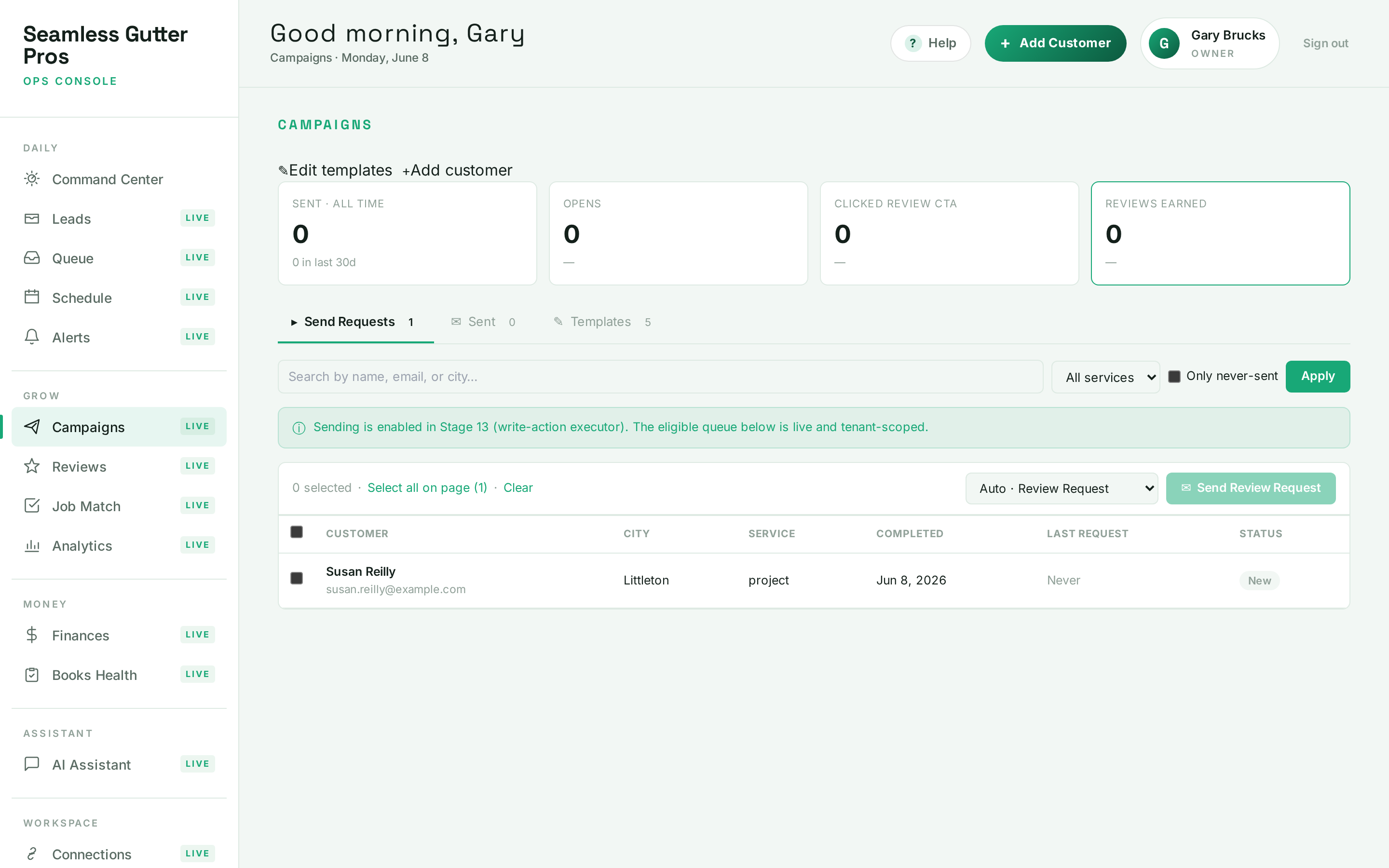
Live screen 5 of 11 — captured from the current product. Job done
You approveFinished jobs turn into 5-star reviews
The moment a job wraps is the moment to ask. SagiFlo drafts a review request to the customer — timed while the work is still fresh — and sends it once you approve. Your live Google rating, review count, and every review sit in one log so nothing slips past you.
- Review requests timed to completed jobs
- Your live Google rating and review count, always current
- Every review in one log — nothing goes unanswered
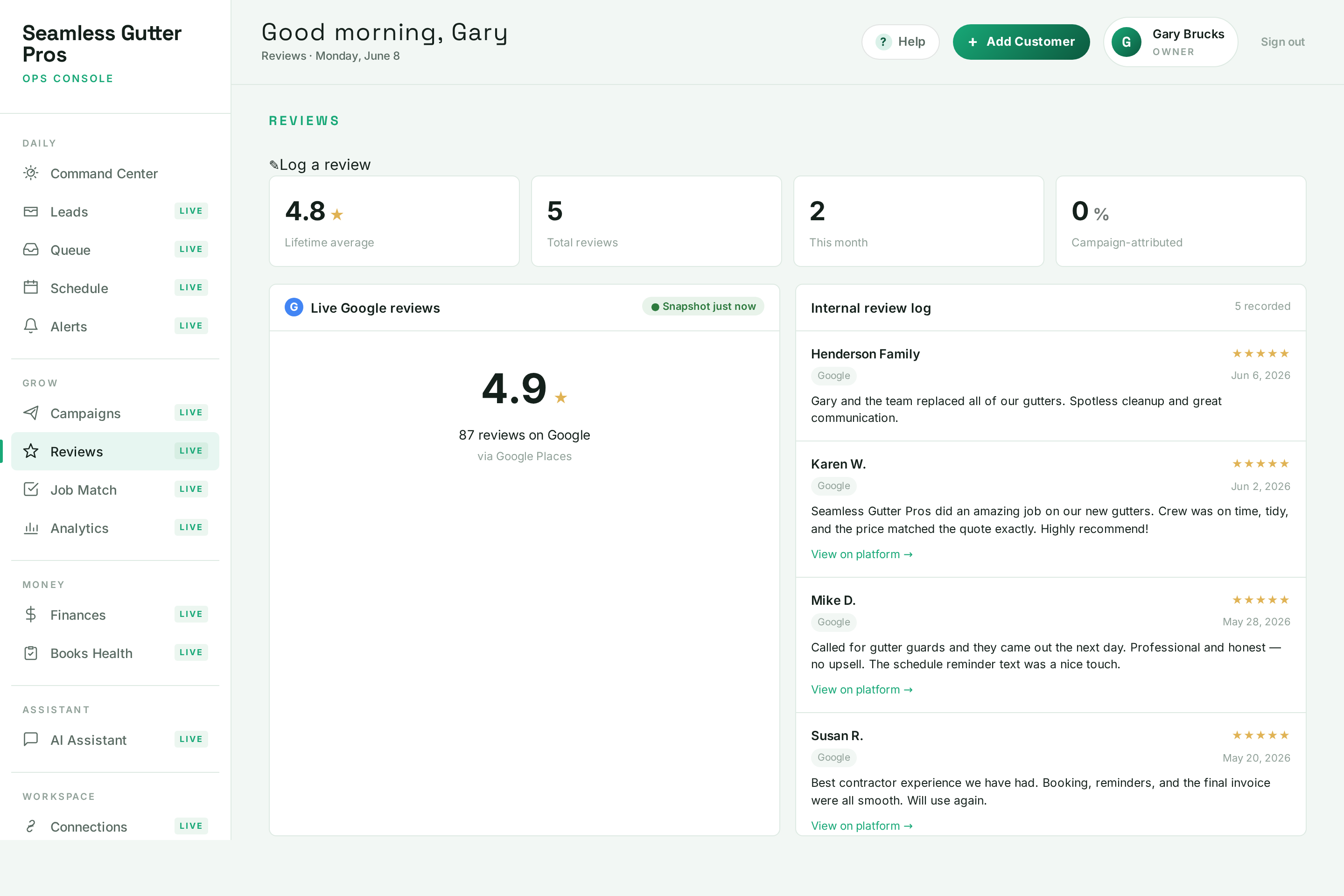
Live screen 6 of 11 — captured from the current product. Stepping back
AutomaticSee what’s actually working
Leads over time by source, your conversion funnel, service mix, where your work comes from, and campaign ROI by template — refreshed live from your real data. The numbers a $25M operation runs on, without hiring an analyst.
- Leads over time, split by source
- Conversion funnel from enquiry to closed job
- Campaign ROI by template — know which asks earn reviews
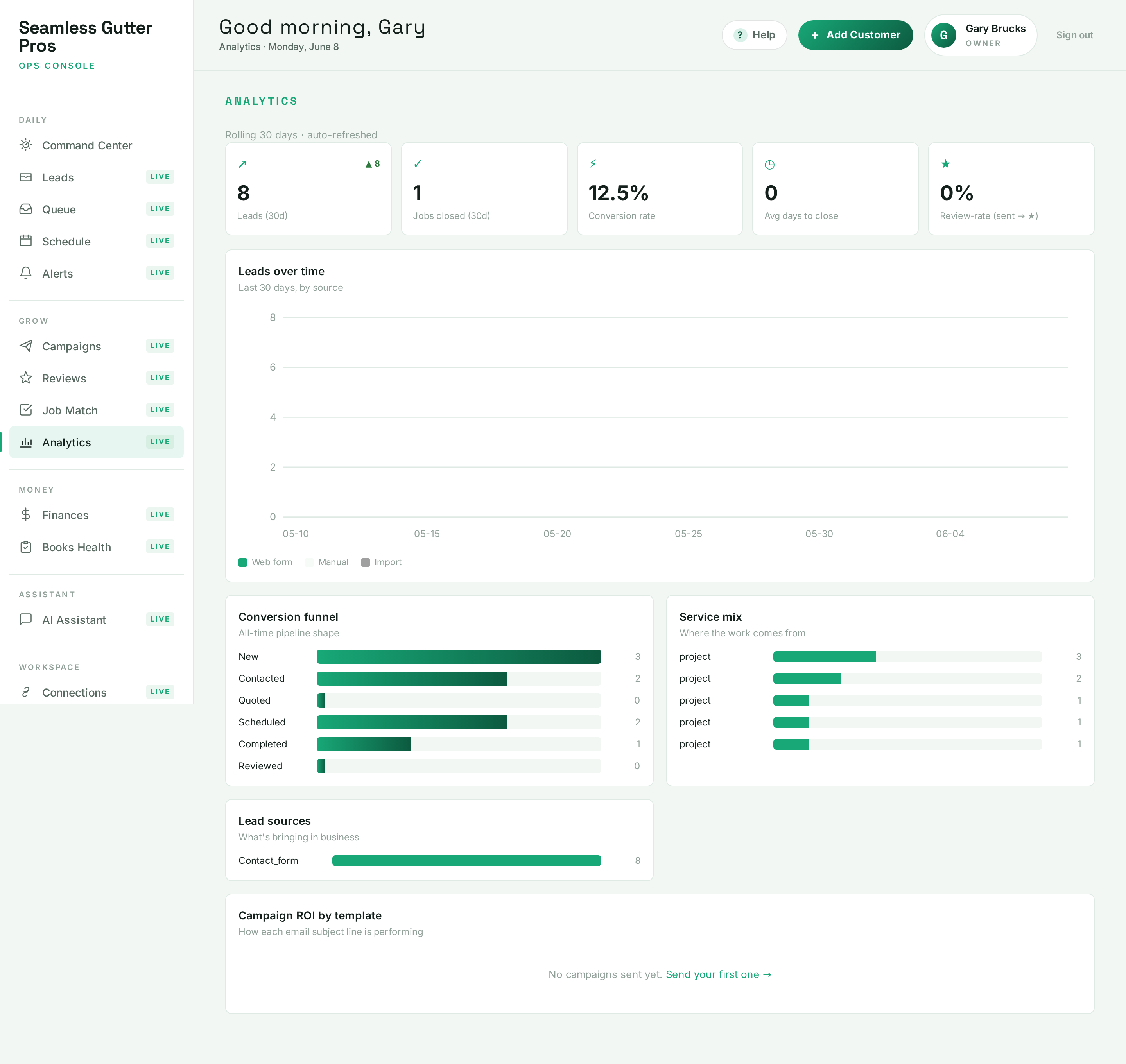
Live screen 7 of 11 — captured from the current product. Getting paid
AutomaticYour money picture, live from QuickBooks
Once QuickBooks is connected, SagiFlo reads your books and lays out the money that matters: net cash in and out, accounts receivable with full aging, who owes you the most and since when, bills due this week, and this month’s profit against last. Read-only by design — SagiFlo never edits, moves, or pays anything in QuickBooks.
- Net cash, receivables aging, and profit & loss — refreshed live
- Top debtors ranked, with oldest due dates, so you know who to nudge
- Strictly read-only — SagiFlo can never touch your money
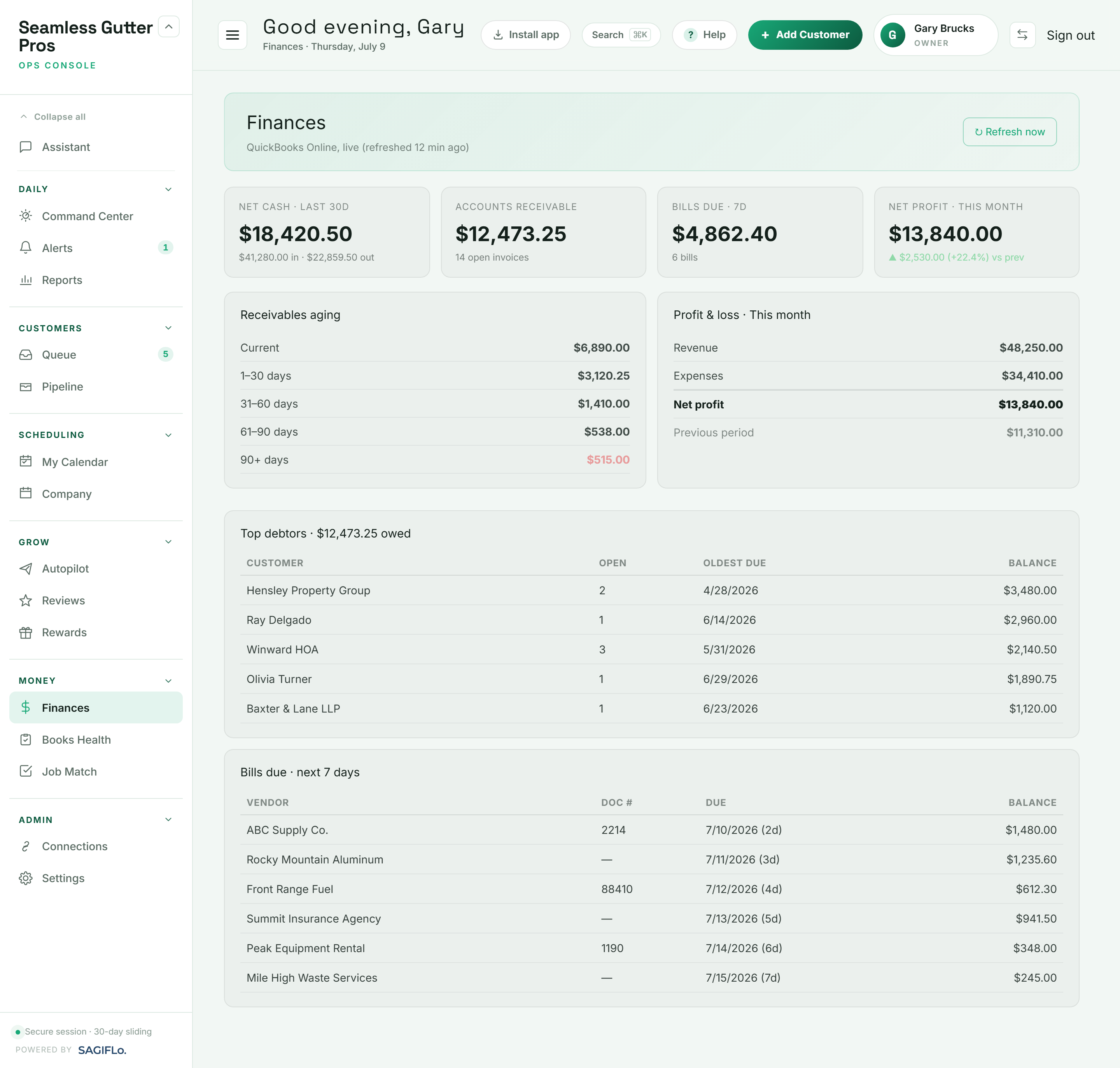
Live screen 8 of 11 — captured from the current product. Keeping the books clean
One clickA report card for your QuickBooks
One scan grades your books A–F across job costing, money placement, data hygiene, receivables, and setup — then lists exactly what to fix, worst first: invoices 90+ days overdue, jobs with no recorded costs, uncategorized money, customers missing contact info. Each finding opens into plain step-by-step guidance you follow yourself.
- A–F grade with five sub-scores, re-scanned on demand
- Every finding prioritized — critical issues first
- Step-by-step fix guides; method-sensitive ones say “ask your accountant”
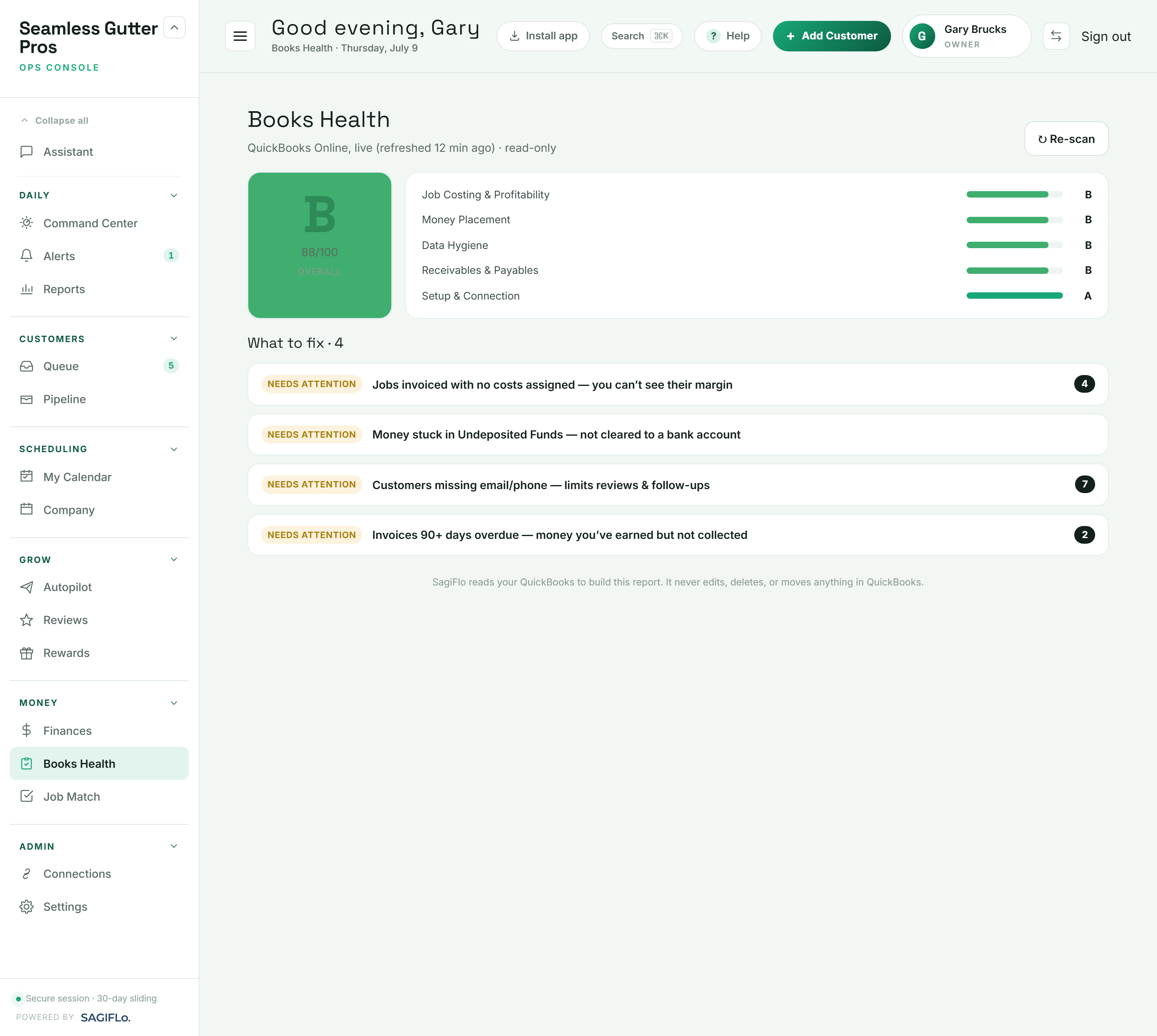
Live screen 9 of 11 — captured from the current product. Anytime you wonder
You approveJust ask — in plain English
“How much do customers owe me right now?” “What’s tomorrow look like?” Ask the Assistant and it answers from your live business data — the same way the Telegram agent does. If it wants to change anything, it proposes the change and waits for your approval first.
- Plain-English questions, answered from live data
- Works in the dashboard and over Telegram
- Any change it suggests waits for your approval
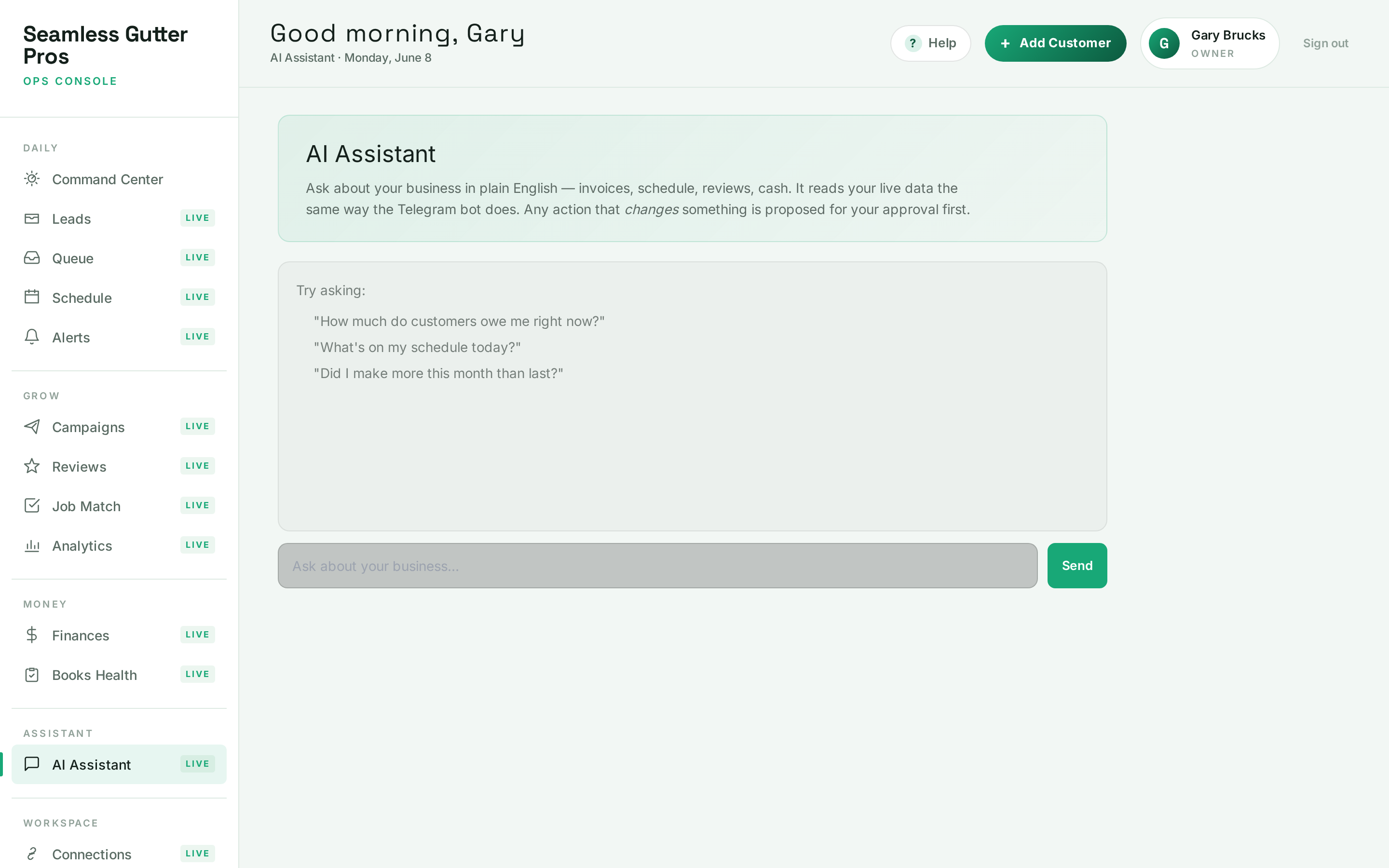
Live screen 10 of 11 — captured from the current product. Underneath it all
One clickConnected to the tools you already run
QuickBooks, Google Calendar, Gmail, and Telegram each connect with secure OAuth — no passwords shared, tokens never touch the dashboard. Every connection shows an honest health status, and one click disconnects it instantly. Text reminders are sent by SagiFlo itself — just flip the opt-in toggle in Settings.
- QuickBooks is read-only — SagiFlo never moves your money
- Honest health status on every connection
- Disconnect anything in one click — your data, your call
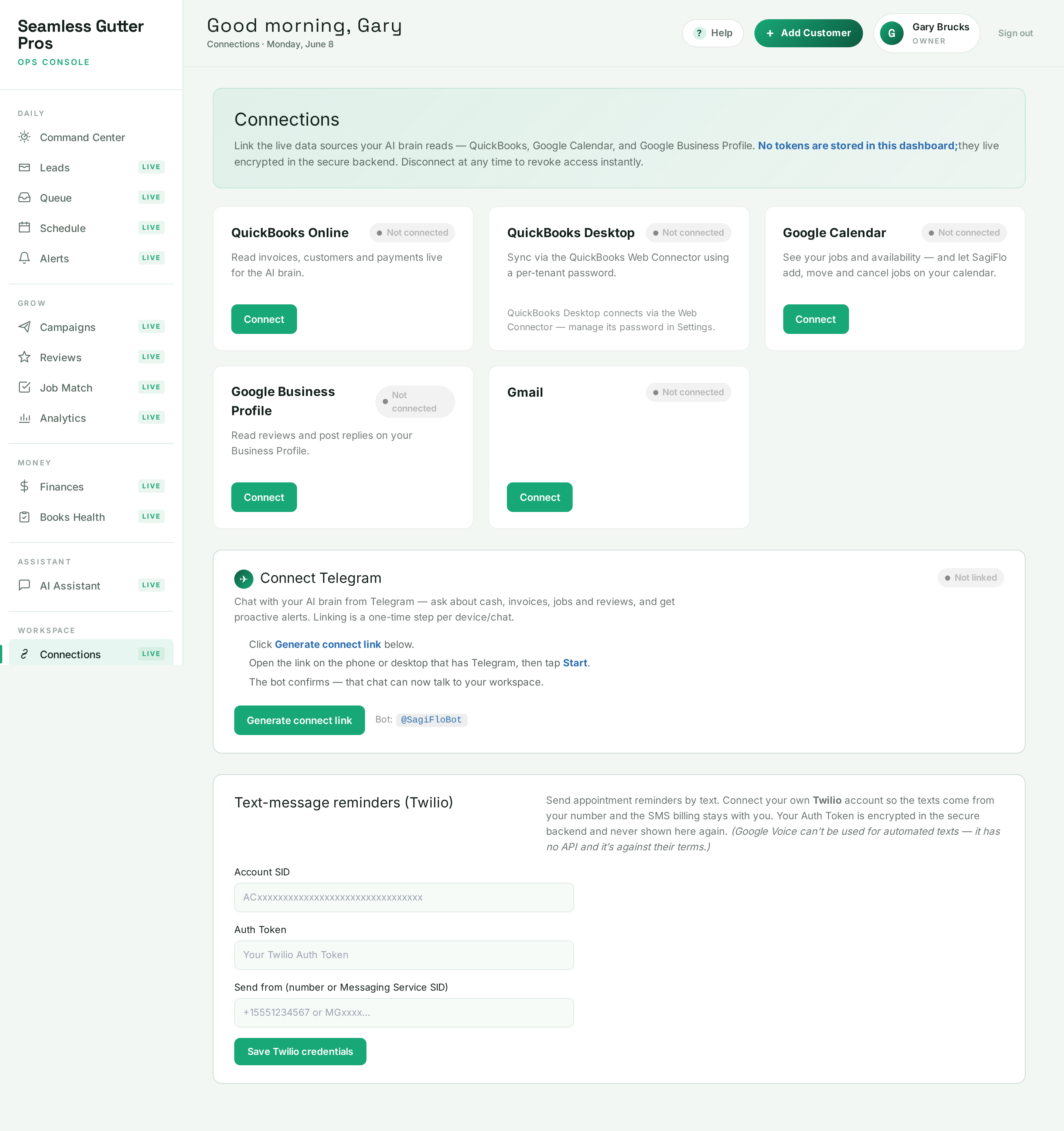
Live screen 11 of 11 — captured from the current product.


…and then tomorrow morning, the Command Center has already sorted your day again. That’s the loop.

Scheduling & calendar
Book the job. SagiFlo writes it to your calendar.
Pick a date from the queue and SagiFlo creates the appointment on your Google Calendar — then keeps it in sync both ways. Drag a job to a new slot and Google updates for you. The agent can add, move, and cancel the jobs it created for you, and only those. Your personal events stay untouched.
- Two-way Google Calendar sync — drag to reschedule
- Job values on the calendar: see what each week is worth
- Crew calendars — send each project to the right crew
Connections
Connect once. Disconnect the instant you want to.
QuickBooks, Google Calendar, Gmail, and your Telegram agent all link with a couple of clicks — each with an honest health status. Your tokens never touch the dashboard; one click revokes access. Text reminders are sent by SagiFlo — just turn them on with a single opt-in toggle in Settings.
- OAuth for Google & Intuit — no passwords shared
- Appointment reminders by email and SMS (via Twilio)
- Revoke any connection instantly, no support ticket

How it works
From connected to caught-up in an afternoon.
- 1
Connect your tools
Link QuickBooks, Google Calendar, Google Business Profile, and email from the Connections screen. Takes minutes, no install.
- 2
The agent starts watching
It reads your live business data, learns what needs attention, and starts surfacing leads, conflicts, reviews, and money to act on.
- 3
Approve actions from Telegram
The agent texts you a proposed action — a reply, a review request, an update. You tap approve. It handles the rest.
In your pocket
This is exactly what the agent texts you.
No new app to learn. The agent works in Telegram — the chat app you already have. It flags what needs attention, drafts the reply or the reminder, and waits for one tap. Nothing goes out until you say so.
- Plain-English updates, no dashboards to dig through
- Approve or edit every action before it happens
- It sends the email & logs the work — it never reads your inbox
A real example of the SagiFlo agent at work — yours will speak in your business’s voice.
Why SagiFlo
Built to remove busywork — not to take the wheel.
Approval-gated by design
The agent never acts on its own. It drafts and asks; you approve. Your judgment stays in the loop on everything that touches a customer or your books.
US company, worldwide reach
SagiFlo runs entirely in the cloud and over Telegram. There is no local install and no service-area limit — wherever you run your contracting business, it works.
Your data, your control
Tokens are never stored in the dashboard. Connect what you want, disconnect the moment you want, and access is revoked immediately. No lock-in.
From the field
Real results from real businesses — coming soon.
We’re an early, founder-run platform, so we’re not going to invent reviews or customer counts. As real businesses put SagiFlo to work, their results and words will live here.
Want to be one of the first? Email support@sagiflo.com or chat on Telegram.
Questions
The straight answers.
What exactly does the agent do?
It watches your connected tools — QuickBooks, Google Calendar, and Google Business Profile — for things that need attention: new leads, schedule conflicts, fresh reviews, unpaid invoices, jobs ready for a review request. It then proposes a specific action — like booking a job to your calendar, or sending a review-request email or text on your behalf — and waits for your approval in Telegram before doing anything. (It sends email and SMS for you, and writes only the calendar events it creates; it does not read your inbox.)
Does it ever act without my permission?
No. Every action the agent takes is behind an approval gate. It drafts the reply, the request, or the update and asks you to confirm. You stay in control; the agent just removes the busywork of noticing and drafting.
How do I choose a plan?
Pick the tier that fits your team — Starter (1–5 users), Pro (6–10), or Elite (11–20). Every plan includes the same full platform — live QuickBooks finances, leads, calendar, reviews, email, and the Telegram agent — so the only thing that changes between tiers is how many people can log in. QuickBooks is included on every plan; the agent reads your invoices, payments, and cash flow out of the box.
How does the free trial work?
Every plan starts with a 7-day free trial on monthly or yearly billing. You connect your tools, the agent starts working, and you are not charged until the trial ends. Cancel anytime during the trial and you pay nothing.
Where is my data, and can I disconnect?
Your tokens are never stored in the dashboard — they live encrypted in a secure backend. You can disconnect any integration at any time from the Connections screen, which revokes access immediately.
Do you only serve a specific city or region?
No. SagiFlo is a US company and the platform serves service businesses worldwide. Everything runs in the cloud and through Telegram, so there is no local install or service-area limit.